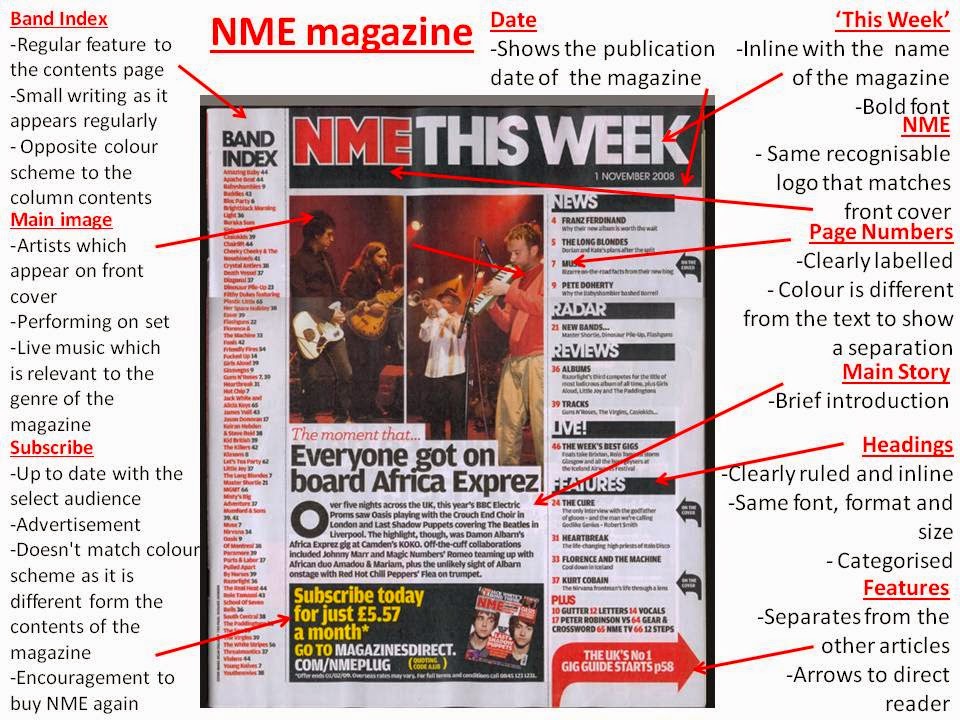
This is my first attempt at a contents page. I have made a collage on http://www.befunky.com to show me editing my main image and other features on my contents page.
This shows me changing my image on the contents page:
The Image Before
The image on the left was my original choice however the image on the right was more suited to my magazine. Therefore this image would work more effectively on my contents page.
Selection
These are some of the images I selected from in order to use for my contents page:
After I decided on the image I was going to use for my contents page, I cut the image out in Photoshop (via the Polygon Lasso Tool) and added a coloured background. This wasn't effective in achieving an image which stood out so I kept the background plain.
MOJO Here I have compared how the front cover of a magazine matches the contents page. Unfortunatley the image on the contents page doesn't match the image which is featured on the front cover. Therefore for my contents page I will use the same artist which appeared on my front cover.